Tracking and managing cloud spending can be difficult in a large organization. While cost-saving configurations help you proactively manage spending, Atlas also provides tools for you to view and analyze spending. You can:
Categorize Atlas resources based on your organization's billing needs.
Leverage billing data to visualize and understand your Atlas spending.
Pull billing data programmatically to integrate with your FinOps tools for charge-back and accounting purposes within each department and application.
On this page, learn how to use built-in Atlas tools and Atlas billing data to track your cloud spending.
Apply Resource Tags
You can apply resource tags in Atlas for precise cost allocation by categorizing resources according to departments, projects, or cost centers. You can also group and analyze tagged resources in financial reports, providing a clear and organized view of how various teams or projects contribute to overall cloud spending. To learn more, see Resource Tags.
Access Billing Data Programmatically
The Atlas Administration API provides a RESTful interface that allows you to programmatically access your billing data for use with external tools and reports. Combine this feature with resource tags to easily categorize your Atlas spending.
You can retrieve all your pending invoices with the
Return All Pending Invoices for One Organization API endpoint. The endpoints response body
contains the results.lineItems.tags field, which reflect the tags
you applied to your resources (such as organizations and clusters).
You can then feed this line-item-level billing data into external FinOps
tools and reports track your Atlas spending by environment, team,
or other tag values.
Enable Cross-Organization Billing
Atlas allows you to share a billing subscription across many organizations and to pay a single invoice for them. Enable cross-organization billing for easy visibility into Atlas spending for all of your organizations.
After you configure a paying organization, you pay invoices for the paying organization that include a list of charges incurred for all linked organizations. To learn more, see Cross-Organization Billing.
After you enable cross-organization billing, you can view linked
invoices if you have the Organization Billing Admin role or
the Organization Owner role for the paying organization.
Review Your Monthly Cost Visualization
To view your billing data monthly, navigate to the Cost Explorer page. The Cost Explorer provides a granular view of cloud spending in chart and table form, allowing users to analyze costs by clusters, projects, or teams. Historical spending data and customizable filters help identify trends and inefficiencies, enabling better financial decision-making and resource optimization. You can view your usage over the past six months, and access your billing data up to the past 18 months. If your organization uses cross-organizational billing, you can view billing data across all linked organizations.
The Billing Cost Explorer filters and groups usage data by organization, project, cluster, and service. Each filter contains a Usage chart with stacked columns representing the total cost incurred each month. Underneath, there is a Usage By Month table that displays the billing data shown in the chart. To learn more, see Billing Cost Explorer.
Review Your Annual Cost Visualization
To view your billing data annually, navigate to the Billing Overview page. This page helps you to understand the costs incurred by your organization's Atlas usage by service, deployment, and project. Each category contains a Usage chart with stacked columns representing the total cost incurred each month. To learm more, see Year-to-Date Usage Chart.
Review Your Invoice Cost Visualization
To view your billing data as an invoice, click on the Invoice Date or Invoice Period you want to view. This page shows you the costs incurred by your Atlas usage over the invoice period through the Total Usage and By Deployment charts.
For the Total Usage chart, you can filter your usage by service to view charges incurred by a particular Atlas service. For the By Deployment chart, you can view the proportion of your usage incurred by each of your clusters across all your projects.
To view line-item charges, see View and Pay Your Past Invoices.
Create Billing Dashboards
You can visualize your billing data in a MongoDB Charts billing dashboard to help you optimize your Atlas spending. Billing dashboards contain prebuilt charts that help you monitor your Atlas usage in an organization across different categories and periods of time, and MongoDB Charts integrates with Atlas to seamlessly ingest billing data.

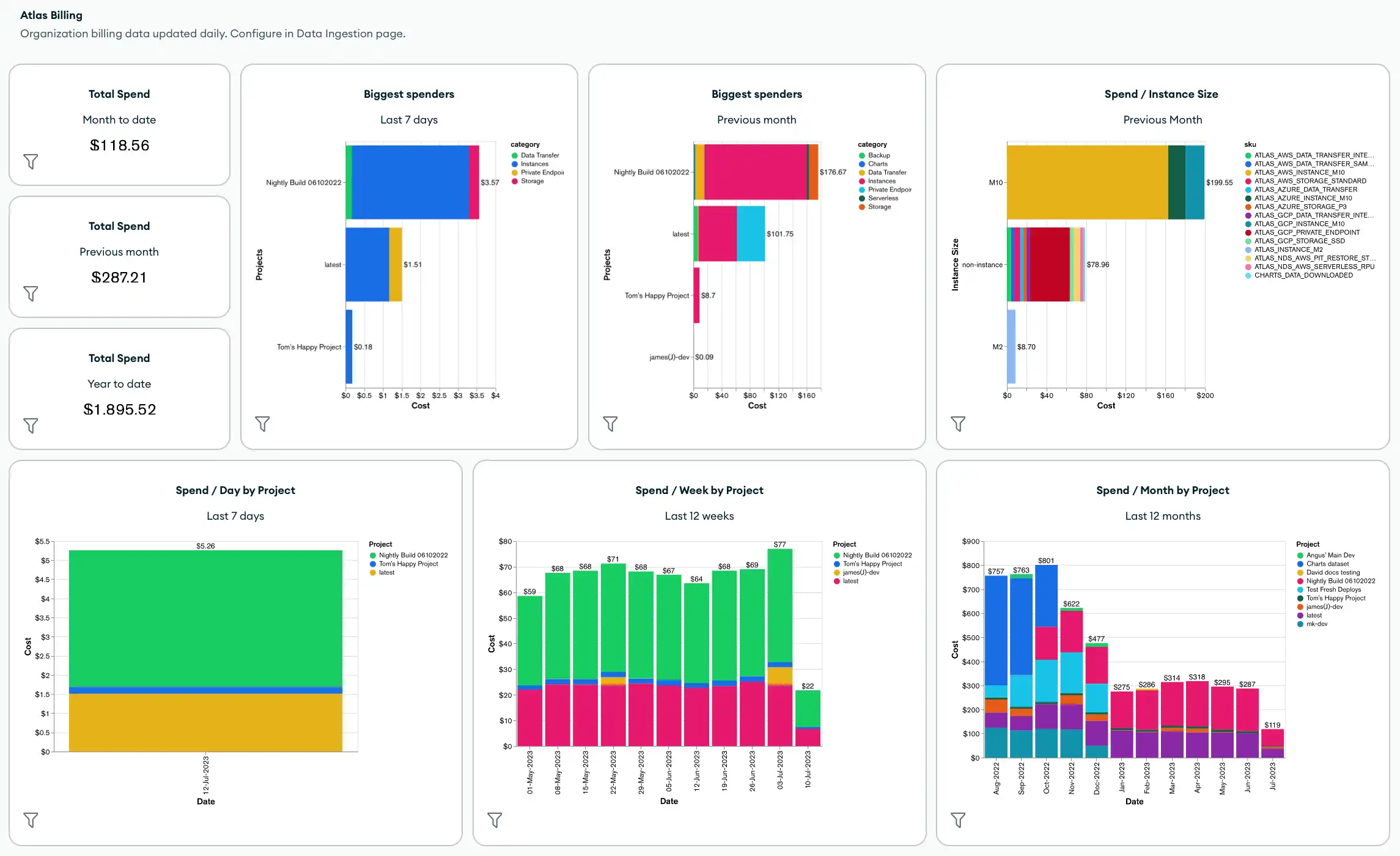
By default, billing dashboards include the following metrics and charts:
Total spending across the organization
Biggest spenders in the organization
Total spending by instance size, project, cluster, product category, or SKU
Total cost by product category
You can also customize your billing dashboard by applying dashboard filters and adding new charts, including any charts that use tags that you've applied to your billing data.
To create or manage a billing dashboard, see Create and Manage Billing Dashboards.
Automation Examples: Atlas Billing
See all of the Atlas Architecture Center Go SDK examples in a single project in the Atlas Architecture Go SDK GitHub repo.
The following examples show how to retrieve and download billing data using Atlas tools for automation.
Before you can authenticate and run the example scripts using the Atlas Go SDK, you must:
Create an Atlas service account. Store your client ID and secret as environment variables by running the following command in the terminal:
export MONGODB_ATLAS_SERVICE_ACCOUNT_ID="<insert your client ID here>" export MONGODB_ATLAS_SERVICE_ACCOUNT_SECRET="<insert your client secret here>" Set the following configuration variables in your Go project:
configs/config.json{ "MONGODB_ATLAS_BASE_URL": "https://cloud.mongodb.com", "ATLAS_ORG_ID": "32b6e34b3d91647abb20e7b8", "ATLAS_PROJECT_ID": "67212db237c5766221eb6ad9", "ATLAS_CLUSTER_NAME": "myCluster", "ATLAS_PROCESS_ID": "myCluster-shard-00-00.ajlj3.mongodb.net:27017" }
For more information on authenticating and creating a client, see the complete Atlas SDK for Go example project in GitHub.
Get Historical Billing Data
The following example script demonstrates how to retrieve historical billing data for an organization, then download the invoices to a CSV or JSON file for further analysis.
// See entire project at https://github.com/mongodb/atlas-architecture-go-sdk package main import ( "context" "fmt" "log" "time" "atlas-sdk-examples/internal/auth" "atlas-sdk-examples/internal/billing" "atlas-sdk-examples/internal/config" "atlas-sdk-examples/internal/data/export" "atlas-sdk-examples/internal/fileutils" "atlas-sdk-examples/internal/orgutils" "github.com/joho/godotenv" "go.mongodb.org/atlas-sdk/v20250219001/admin" ) func main() { envFile := ".env.production" if err := godotenv.Load(envFile); err != nil { log.Printf("Warning: could not load %s file: %v", envFile, err) } secrets, cfg, err := config.LoadAllFromEnv() if err != nil { log.Fatalf("Failed to load configuration %v", err) } ctx := context.Background() client, err := auth.NewClient(ctx, cfg, secrets) if err != nil { log.Fatalf("Failed to initialize authentication client: %v", err) } p := &admin.ListInvoicesApiParams{ OrgId: cfg.OrgID, } fmt.Printf("Fetching historical invoices for organization: %s\n", p.OrgId) // Fetch invoices from the previous six months with the provided options invoices, err := billing.ListInvoicesForOrg(ctx, client.InvoicesApi, p, billing.WithViewLinkedInvoices(true), billing.WithIncludeCount(true), billing.WithDateRange(time.Now().AddDate(0, -6, 0), time.Now())) if err != nil { log.Fatalf("Failed to retrieve invoices: %v", err) } if invoices.GetTotalCount() > 0 { fmt.Printf("Total count of invoices: %d\n", invoices.GetTotalCount()) } else { fmt.Println("No invoices found for the specified date range") return } // Get organization name for more user-friendly filenames orgName, err := orgutils.GetOrganizationName(ctx, client.OrganizationsApi, p.OrgId) if err != nil { // Non-critical error, continue with orgID as name fmt.Printf("Warning: %v\n", err) orgName = p.OrgId } sanitizedOrgName := orgutils.SanitizeForFilename(orgName) // Export invoice data to be used in other systems or for reporting outDir := "invoices" prefix := fmt.Sprintf("historical_%s", sanitizedOrgName) err = exportInvoicesToJSON(invoices, outDir, prefix) if err != nil { log.Fatalf("Failed to export invoices to JSON: %v", err) } err = exportInvoicesToCSV(invoices, outDir, prefix) if err != nil { log.Fatalf("Failed to export invoices to CSV: %v", err) } } func exportInvoicesToJSON(invoices *admin.PaginatedApiInvoiceMetadata, outDir, prefix string) error { jsonPath, err := fileutils.GenerateOutputPath(outDir, prefix, "json") if err != nil { return fmt.Errorf("failed to generate JSON output path: %v", err) } if err := export.ToJSON(invoices.GetResults(), jsonPath); err != nil { return fmt.Errorf("failed to write JSON file: %v", err) } fmt.Printf("Exported invoice data to %s\n", jsonPath) return nil } func exportInvoicesToCSV(invoices *admin.PaginatedApiInvoiceMetadata, outDir, prefix string) error { csvPath, err := fileutils.GenerateOutputPath(outDir, prefix, "csv") if err != nil { return fmt.Errorf("failed to generate CSV output path: %v", err) } // Set the headers and mapped rows for the CSV export headers := []string{"InvoiceID", "Status", "Created", "AmountBilled"} err = export.ToCSVWithMapper(invoices.GetResults(), csvPath, headers, func(invoice admin.BillingInvoiceMetadata) []string { return []string{ invoice.GetId(), invoice.GetStatusName(), invoice.GetCreated().Format(time.RFC3339), fmt.Sprintf("%.2f", float64(invoice.GetAmountBilledCents())/100.0), } }) if err != nil { return fmt.Errorf("failed to write CSV file: %v", err) } fmt.Printf("Exported invoice data to %s\n", csvPath) return nil }
Get Pending Invoices
The following example script demonstrates how to retrieve pending invoices for an organization, then download the invoices to a CSV or JSON file for further analysis.
// See entire project at https://github.com/mongodb/atlas-architecture-go-sdk package main import ( "context" "fmt" "log" "atlas-sdk-examples/internal/auth" "atlas-sdk-examples/internal/billing" "atlas-sdk-examples/internal/config" "atlas-sdk-examples/internal/data/export" "atlas-sdk-examples/internal/fileutils" "atlas-sdk-examples/internal/orgutils" "github.com/joho/godotenv" "go.mongodb.org/atlas-sdk/v20250219001/admin" ) func main() { envFile := ".env.production" if err := godotenv.Load(envFile); err != nil { log.Printf("Warning: could not load %s file: %v", envFile, err) } secrets, cfg, err := config.LoadAllFromEnv() if err != nil { log.Fatalf("Failed to load configuration %v", err) } ctx := context.Background() client, err := auth.NewClient(ctx, cfg, secrets) if err != nil { log.Fatalf("Failed to initialize authentication client: %v", err) } p := &admin.ListInvoicesApiParams{ OrgId: cfg.OrgID, } fmt.Printf("Fetching pending invoices for organization: %s\n", p.OrgId) details, err := billing.CollectLineItemBillingData(ctx, client.InvoicesApi, client.OrganizationsApi, p.OrgId, nil) if err != nil { log.Fatalf("Failed to retrieve pending invoices for %s: %v", p.OrgId, err) } if len(details) == 0 { fmt.Printf("No pending invoices found for organization: %s\n", p.OrgId) return } fmt.Printf("Found %d line items in pending invoices\n", len(details)) // Use organization name from the returned details for more user-friendly filenames orgName := details[0].Org.Name sanitizedOrgName := orgutils.SanitizeForFilename(orgName) // Export invoice data to be used in other systems or for reporting outDir := "invoices" prefix := fmt.Sprintf("pending_%s", sanitizedOrgName) err = exportInvoicesToJSON(details, outDir, prefix) if err != nil { log.Fatalf("Failed to export invoices to JSON: %v", err) } err = exportInvoicesToCSV(details, outDir, prefix) if err != nil { log.Fatalf("Failed to export invoices to CSV: %v", err) } } func exportInvoicesToJSON(details []billing.Detail, outDir, prefix string) error { jsonPath, err := fileutils.GenerateOutputPath(outDir, prefix, "json") if err != nil { return fmt.Errorf("failed to generate JSON output path: %v", err) } if err := export.ToJSON(details, jsonPath); err != nil { return fmt.Errorf("failed to write JSON file: %v", err) } fmt.Printf("Exported billing data to %s\n", jsonPath) return nil } func exportInvoicesToCSV(details []billing.Detail, outDir, prefix string) error { csvPath, err := fileutils.GenerateOutputPath(outDir, prefix, "csv") if err != nil { return fmt.Errorf("failed to generate CSV output path: %v", err) } // Set the headers and mapped rows for the CSV export headers := []string{"Organization", "OrgID", "Project", "ProjectID", "Cluster", "SKU", "Cost", "Date", "Provider", "Instance", "Category"} err = export.ToCSVWithMapper(details, csvPath, headers, func(item billing.Detail) []string { return []string{ item.Org.Name, item.Org.ID, item.Project.Name, item.Project.ID, item.Cluster, item.SKU, fmt.Sprintf("%.2f", item.Cost), item.Date.Format("2006-01-02"), item.Provider, item.Instance, item.Category, } }) if err != nil { return fmt.Errorf("failed to write CSV file: %v", err) } fmt.Printf("Exported billing data to %s\n", csvPath) return nil }
Get Linked Organizations
The following example script demonstrates how to retrieve a list of linked organizations and their IDs from the billing organization.
// See entire project at https://github.com/mongodb/atlas-architecture-go-sdk package main import ( "context" "fmt" "log" "atlas-sdk-examples/internal/auth" "atlas-sdk-examples/internal/billing" "atlas-sdk-examples/internal/config" "github.com/joho/godotenv" "go.mongodb.org/atlas-sdk/v20250219001/admin" ) func main() { envFile := ".env.production" if err := godotenv.Load(envFile); err != nil { log.Printf("Warning: could not load %s file: %v", envFile, err) } secrets, cfg, err := config.LoadAllFromEnv() if err != nil { log.Fatalf("Failed to load configuration %v", err) } ctx := context.Background() client, err := auth.NewClient(ctx, cfg, secrets) if err != nil { log.Fatalf("Failed to initialize authentication client: %v", err) } p := &admin.ListInvoicesApiParams{ OrgId: cfg.OrgID, } fmt.Printf("Fetching linked organizations for billing organization: %s\n", p.OrgId) invoices, err := billing.GetCrossOrgBilling(ctx, client.InvoicesApi, p) if err != nil { log.Fatalf("Failed to retrieve cross-organization billing data for %s: %v", p.OrgId, err) } displayLinkedOrganizations(invoices, p.OrgId) } func displayLinkedOrganizations(invoices map[string][]admin.BillingInvoiceMetadata, primaryOrgID string) { var linkedOrgs []string for orgID := range invoices { if orgID != primaryOrgID { linkedOrgs = append(linkedOrgs, orgID) } } if len(linkedOrgs) == 0 { fmt.Println("No linked organizations found for the billing organization") return } fmt.Printf("Found %d linked organizations:\n", len(linkedOrgs)) for i, orgID := range linkedOrgs { fmt.Printf(" %d. Organization ID: %s\n", i+1, orgID) } }